DGX AI Cluster

The DGX GPU Cluster at the Centre of Computational and Data Sciences (CCDS), IIT Kharagpur, is a state-of-the-art AI and High-Performance Computing (HPC) facility designed to support large-scale deep learning, artificial intelligence, scientific computing, and data-intensive research. The cluster provides a scalable and reliable computing platform for advanced research and enterprise-grade AI applications.
The infrastructure comprises five NVIDIA DGX H100 systems, each equipped with eight NVIDIA H100 Tensor Core GPUs and high-speed NVMe storage. Four DGX nodes (dgx1–dgx4) are grouped under the dgx_all partition to support both single-node and multi-node GPU workloads, while the fifth node (dgx5) is dedicated to the dgx_ccds partition. The cluster is managed through a High Availability (HA) architecture based on three dedicated Intel Xeon Gold 6530 servers hosting the login nodes, Slurm controller, OpenLDAP, Grafana, and other management services using Proxmox Virtual Environment.
To deliver high-performance data access, the cluster is integrated with a dedicated 1.1 PiB Parallel File System (PFS) connected through NVIDIA Quantum InfiniBand networking with 400 Gbps bandwidth. This high-speed storage infrastructure enables efficient distributed training, multi-node GPU computing, and rapid access to large datasets while significantly reducing I/O bottlenecks.
To ensure efficient utilization of GPU resources, users with CPU-intensive workloads or applications requiring less than 16 GB GPU memory per GPU are encouraged to use the Param Shakti HPC Cluster. This policy helps minimize queue waiting times and ensures timely access to the DGX cluster for GPU-intensive AI workloads.
The DGX GPU Cluster represents IIT Kharagpur's flagship AI computing infrastructure, providing researchers with a robust, scalable, and high-performance environment for next-generation artificial intelligence, machine learning, and computational science.
Network Architecture
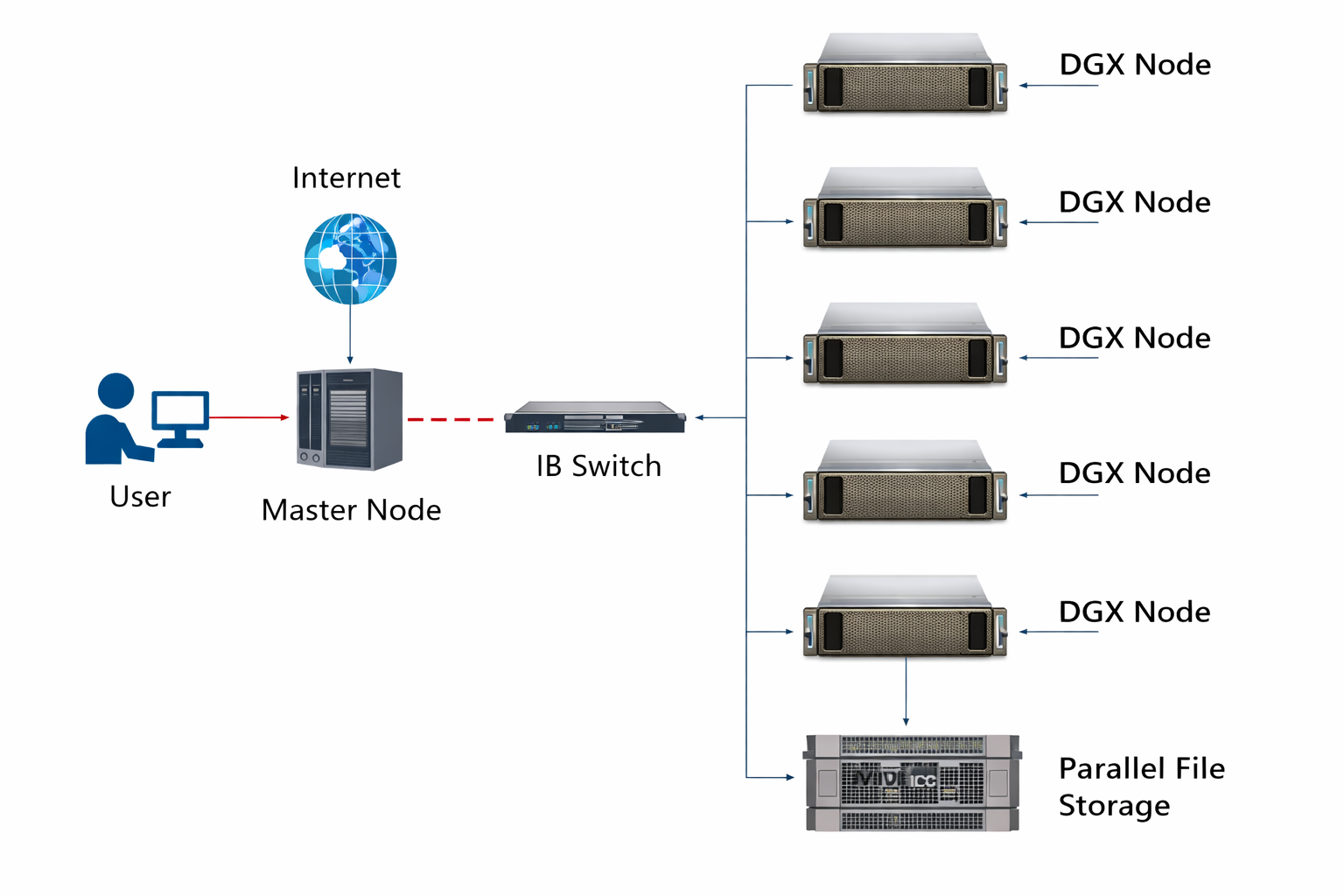
System Architecture
| Component | Specification |
|---|---|
| High Availability Management Infrastructure | 3 × Intel Xeon Gold 6530 Servers (Proxmox HA Cluster) |
| Compute Nodes | 5 × NVIDIA DGX H100 Systems |
| GPU Configuration | 40 × NVIDIA H100 GPUs (8 GPUs × 5 Nodes) |
| Parallel Storage | 1.1 PiB Lustre Parallel File System |
| Network | NVIDIA Quantum InfiniBand 400 Gbps |
Cluster Features
Three Intel Xeon Gold 6530 servers configured with Proxmox Virtual Environment provide High Availability for the login nodes, Slurm controller, OpenLDAP, Grafana, and other cluster management services.
High-performance shared storage providing scalable, high-throughput data access for large datasets, distributed AI workloads, and multi-node GPU computing.
Ultra-low latency, high-bandwidth networking interconnecting compute nodes and storage infrastructure for efficient multi-node communication.
The dgx_all partition enables both single-node and multi-node job execution across DGX1–DGX4, allowing users to scale distributed AI training and HPC applications.
Advanced resource scheduling with QoS policies, fair resource sharing, and efficient GPU allocation for AI and HPC workloads.
Users whose workloads require less than 16 GB GPU memory per GPU or are primarily CPU-intensive are encouraged to use the Param Shakti HPC Cluster. This helps reduce queue waiting times and ensures DGX resources remain available for GPU-intensive applications.
Cluster Access
Login Command:
ssh <username>@gpucluster.iitkgp.ac.in
Partition Mapping:
- dgx_all → DGX1, DGX2, DGX3 and DGX4 (Supports both single-node and multi-node jobs)
- dgx_ccds → DGX5 (Dedicated CCDS partition)
--nodes=<N> and the required GPUs per node using --gres=gpu:<count>.
Storage & Data Management
- 1.5 TB quota in
/home/<username>. - ~1 TB RAID storage allocated on the assigned DGX node, accessible as
/dgx<node>/<username>. - For multi-node jobs, datasets and job-related files should be stored in the
/home/<username>directory. - Use the
myquotacommand to check your storage quota and usage.
Example:
cd /home/<username>
myquota
QOS Restrictions
| QoS Name | Max Jobs/User | Max CPUs | Min GPUs | Max GPUs | Max Wall Time |
|---|---|---|---|---|---|
| gpu2 | 3 | 56 | 1 | 2 | 72 Hrs (3 days) |
| gpu4 | 2 | 56 | 3 | 4 | 48 Hrs (2 days) |
| gpu6 | 1 | 112 | 5 | 6 | 24 Hrs (1 day) |
| gpu8 | 1 | 112 | 7 | 8 | 12 Hours |
User Guide
Important Job Submission Guidelines
- Select the appropriate partition (
dgx_allordgx_ccds) based on your allocation. - Jobs can be submitted to one or more nodes using
#SBATCH --nodes=<N>. - Specify the required GPUs per node using
#SBATCH --gres=gpu:<count>and ensure it complies with the selected QoS. - The number of tasks per node (
--ntasks-per-node) should match your application's resource requirements. - For multi-node jobs, store datasets and job-related files in
/home/<username>. - Applications requiring less than 16 GB GPU memory per GPU or primarily CPU-intensive workloads should be executed on the Param Shakti HPC Cluster to ensure efficient utilization of DGX resources.
Sample Submission Commands
sbatch /home/train_script.sh

cd /home/<username>
sbatch script.sh
Common Errors
Issue: GPU count requested exceeds QoS limits.
#SBATCH --qos=gpu2
#SBATCH --gres=gpu:4   # gpu2 allows max 2 GPUs
Fix: Match GPU count with selected QoS.
Issue: Requested time exceeds allowed QoS wall time.
#SBATCH --qos=gpu4
#SBATCH --time=72:00:00   # gpu4 max is 48 hours
Fix: Reduce wall time or select appropriate QoS.
Issue: Job submitted from compute node instead of master node.
sbatch /raid/<username>/train_script.sh # Incorrect
Fix:
cd ~
sbatch train_script.sh   # Submit from home directory
Useful Monitoring Commands
sinfo– View available partitions and node status.squeue– Monitor running and pending jobs.scontrol show job <job_id>– View detailed information about a job.myquota– Check your storage quota and usage.df -h– Display mounted file systems and available storage.module avail– List available software modules.module list– Display currently loaded modules.nvidia-smi– Monitor GPU utilization and memory usage.
Getting Started with Parallel Computing using MATLAB
on the Param Shakti HPC and DGX AI Cluster.
📄 Download Combined Document (PS & DGX AI)For additional documents and recordings from the workshop held in May 2022, please visit the link below:
🔗 View Workshop Materials